Fundamentals of Simultaneous Multithreading (SMT)
Written on January 30th, 2026 by Mukesh Kumar Chaurasiya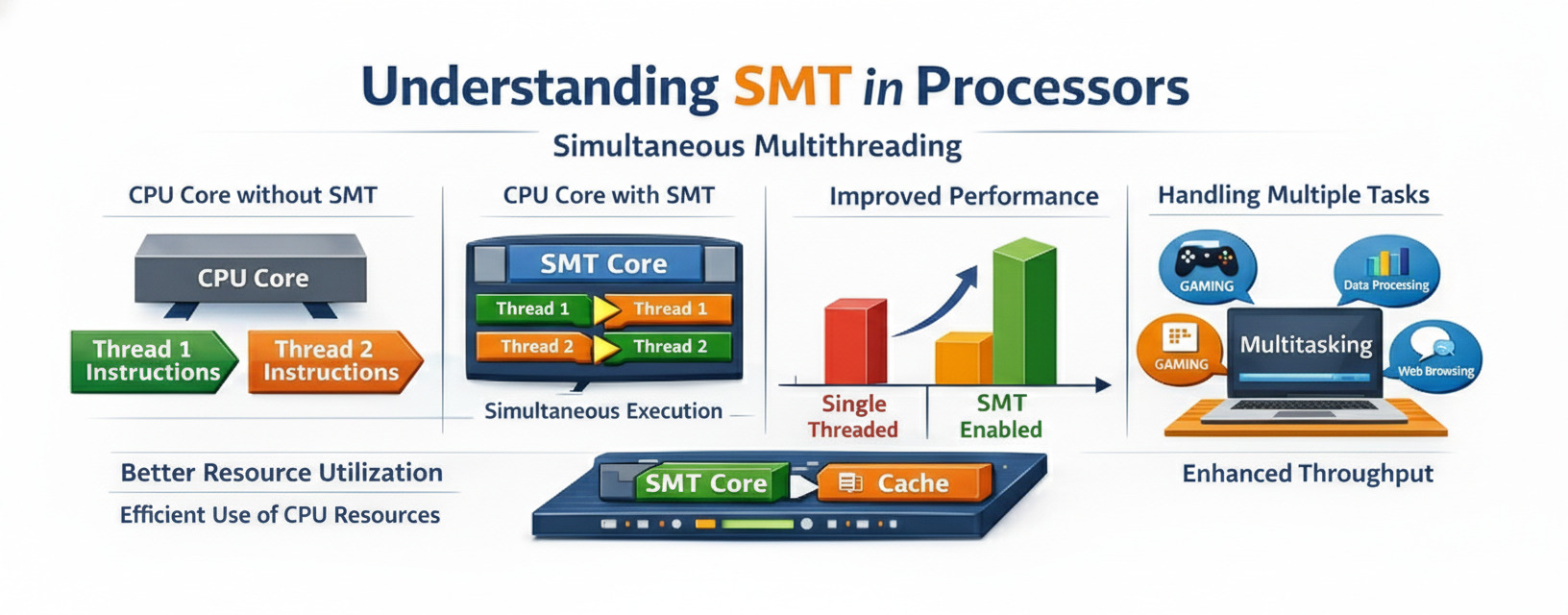
Abstract
Modern processors frequently underutilize execution resources due to pipeline stalls caused by cache misses, branch mispredictions, and limited instruction-level parallelism. Simultaneous Multithreading (SMT) enables multiple hardware threads to share a single processor core, improving resource utilization and overall throughput. This blog surveys the architectural foundations of SMT and evaluates its performance implications on power processors. We analyze throughput gains, resource contention, and fairness trade-offs using representative workloads, and discuss limitations related to cache contention and security vulnerabilities.
I. Introduction
Modern superscalar processors are designed to exploit instruction-level parallelism (ILP) to improve performance. However, practical workloads often fail to fully utilize available execution resources due to pipeline stalls caused by memory latency, control hazards, and data dependencies.
Simultaneous Multithreading (SMT) addresses this limitation by allowing multiple independent hardware threads to issue instructions concurrently within a single core. By overlapping stalls from one thread with useful work from another, SMT improves overall throughput without duplicating execution resources.
II. Background and Related Work
Tullsen et al. first introduced SMT as a technique to improve processor utilization by issuing instructions from multiple threads in the same cycle [1]. Subsequent implementations, such as IBM POWER SMT and Intel Hyper-Threading have demonstrated the practicality of SMT in commercial processors.
Prior work has examined SMT scheduling policies, cache contention, and fairness issues. Recent studies have also explored security implications arising from shared microarchitectural resources.
III. SMT Architecture
A. Key concepts
Physical Core vs Logical Core:
- A physical core is the actual hardware processing unit
- A logical core (or hardware thread) is what the OS sees and can schedule work to
- With SMT, one physical core can present multiple logical cores (typically 2 or 4)
Resource Sharing: SMT works by sharing various CPU resources among threads:
- Execution units (ALU, FPU, etc.)
- Caches (L1, L2, L3)
- Branch prediction units
- Memory management units
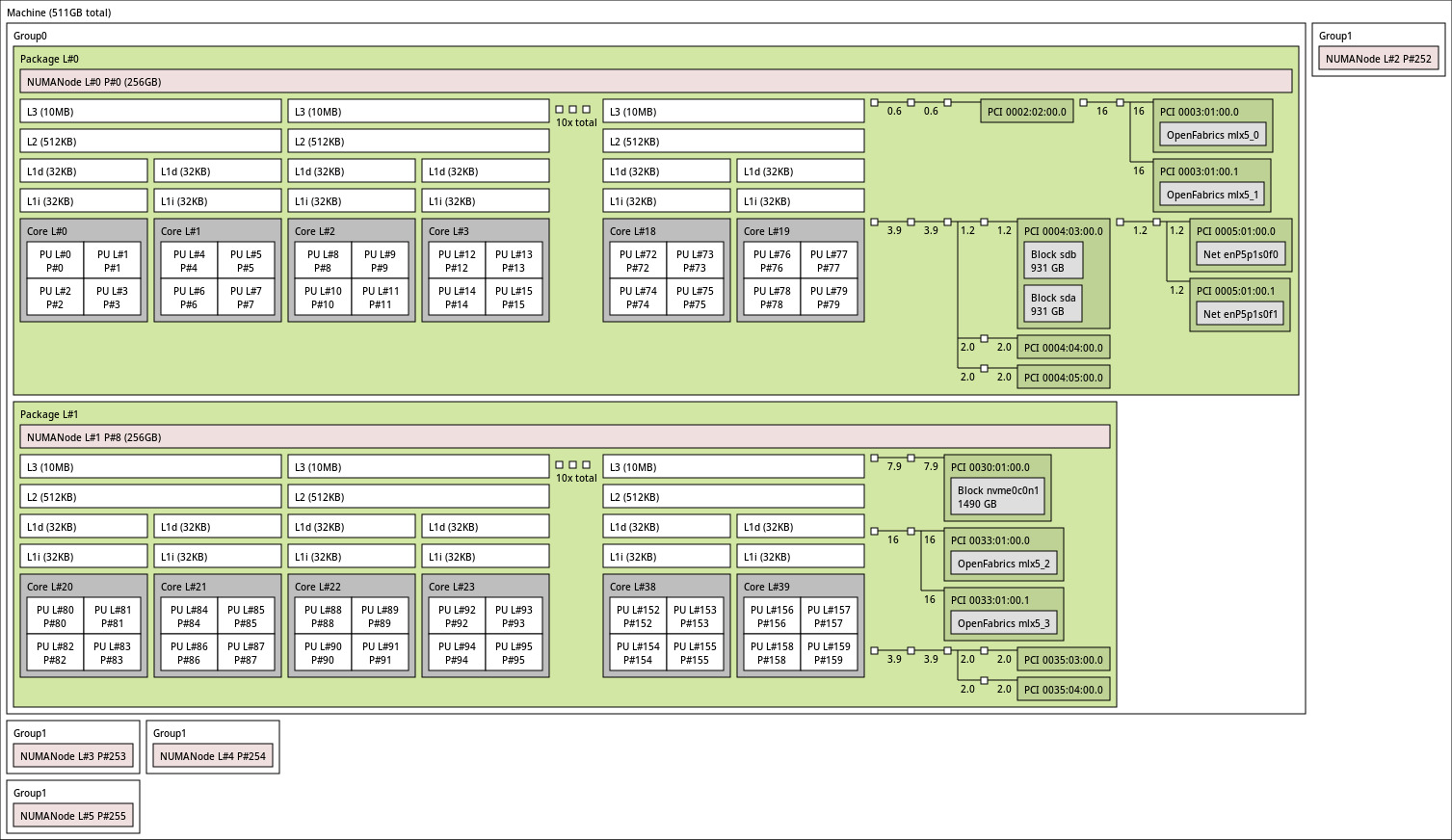
This is a topology from a power9 processor. Each Physical core has 4 SMT threads with dedicated L1 cache. L2 and L3 cache is being shared by 2 cores hence for rest of the blog we will call a core with 4 SMT threads as small core and 2 small cores as big core. We can say that a big core is a completely independent smallest unit in the processor core. Each big core has 8 SMT threads, 2 units of each compute unit, 2 set of L1 cache and 1 set of L2 and L3 cache.
In summary:
- Each Big core has 2 small cores shared L2 and L3 cache between 2 small cores.
- Each small core has individual compute units and L1 cache.
IV. Experimental Methodology
Our evaluation considers an SMT-capable processor with eight hardware threads per big core (SMT8). We will keep the processor in SMT1(or single thread (ST)) mode, and then gear up with SMT2, SMT4 and SMT8 modes and check the throughput in a particular time span. Throughtout the experiments we will cosider the time span of the experiments to be fixed at 60 secs. The processor has 10 big cores on the same socket. We will use 80 stress-ng threads in each smt modes and see the performance.
below are the results for each experiment.
numactl --cpunodebind=0 --membind=0 stress-ng --cpu 80 --intmath 0 --timeout 60s --metrics
we took only the add64 from this.
numactl --cpunodebind=0 --membind=0 stress-ng --cpu 80 --branch 0 --timeout 60s --metrics
numactl --cpunodebind=0 --membind=0 stress-ng --cpu 80 --fp 0 --timeout 60s --metrics
numactl --cpunodebind=0 --membind=0 stress-ng --cpu 80 --intmath 0 --branch 0 --fp 0 --timeout 60s --metrics
numactl --cpunodebind=0 --membind=0 stress-ng --cpu 80 --cache 0 --timeout 60s --metrics
numactl --cpunodebind=0 --membind=0 stress-ng --cpu 80 --stream 0 --timeout 60s --metrics
numactl --cpunodebind=0 --membind=0 stress-ng --cpu 80 --atomic 0 --timeout 60s --metrics
numactl --cpunodebind=0 --membind=0 stress-ng --cpu 80 --syscall 0 --timeout 60s --metrics
numactl --cpunodebind=0 --membind=0 stress-ng --cpu 80 --tlb-shootdown 0 --timeout 60s --metrics
A. Benchmarks
We use a combination of microbenchmarks and standard benchmark suites to characterize SMT behavior under diverse workload conditions.
B. Metrics
Performance is evaluated using the following metrics:
- Instructions per cycle (IPC)
- System throughput
- Fairness between threads
V. Results and Analysis
Our results show that SMT improves throughput by up to 25–30% for memory-latency-bound workloads. However, workloads that heavily utilize shared execution resources may experience performance degradation.
A. Throughput Improvement
SMT is most effective when threads exhibit complementary resource usage patterns.
B. Resource Contention
Cache contention remains a key limiting factor for SMT scalability.
VI. Limitations and Security Implications
While SMT improves performance, shared microarchitectural resources expose processors to side-channel attacks such as Spectre and MDS. As a result, some cloud providers disable SMT by default for security isolation.
VII. Conclusion
Simultaneous Multithreading remains an effective technique for improving processor utilization and throughput. Its benefits are workload-dependent and must be balanced against fairness, predictability, and security concerns. Future work includes improved scheduling and resource isolation mechanisms.
References
Simultaneous Multithreading (SMT) is a processor design technique that allows multiple threads to execute simultaneously on a single physical processor core. This technology, popularized by Intel’s Hyper-Threading, has become a cornerstone of modern CPU architecture, enabling better resource utilization and improved performance.
What is Simultaneous Multithreading?
SMT is a hardware-level technique that enables a single physical CPU core to appear as multiple logical processors to the operating system. Unlike traditional multitasking where the CPU rapidly switches between threads, SMT allows multiple threads to execute truly simultaneously by sharing the core’s execution resources.
Key Concepts
Physical Core vs Logical Core:
- A physical core is the actual hardware processing unit
- A logical core (or hardware thread) is what the OS sees and can schedule work to
- With SMT, one physical core can present multiple logical cores (typically 2)
Resource Sharing: SMT works by sharing various CPU resources among threads:
- Execution units (ALU, FPU, etc.)
- Caches (L1, L2, L3)
- Branch prediction units
- Memory management units
How SMT Works
The Problem SMT Solves
Modern processors have multiple execution units that can perform different operations simultaneously. However, a single thread often cannot utilize all these resources efficiently due to:
- Pipeline stalls - waiting for memory access
- Branch mispredictions - incorrect speculation
- Data dependencies - waiting for previous operations
- Limited instruction-level parallelism - not enough independent instructions
The SMT Solution
SMT addresses this by allowing multiple threads to share the execution resources:
Traditional Single-Thread Core:
[Thread A] → [Execution Units: 40% utilized]

SMT-Enabled Core:
[Thread A] ↘
            → [Execution Units: 70-80% utilized]
[Thread B] ↗
When Thread A stalls (e.g., waiting for memory), Thread B can use the idle execution units, significantly improving overall throughput.
Architecture Details
Duplicated Resources
For SMT to work, certain resources must be duplicated per thread:
- Program Counter (PC) - tracks instruction position
- Register Files - stores thread-specific data
- Return Stack Buffer - manages function calls
- Thread State - maintains execution context
Shared Resources
Other resources are shared between threads:
- Execution Units - ALU, FPU, SIMD units
- Caches - L1, L2, and L3 caches
- TLB - Translation Lookaside Buffer
- Branch Predictor - predicts branch outcomes
Performance Characteristics
When SMT Helps
SMT provides the most benefit when:
- Memory-bound workloads - threads waiting for memory access
- Mixed workload types - integer and floating-point operations
- High thread-level parallelism - many independent threads
- Cache-friendly applications - good data locality
Example Performance Gains:
- Web servers: 20-30% improvement
- Database queries: 15-25% improvement
- Compilation tasks: 10-20% improvement
When SMT Hurts
SMT can reduce performance when:
- Cache contention - threads compete for cache space
- Compute-intensive tasks - fully utilizing execution units
- Memory bandwidth saturation - memory bus is the bottleneck
- Security-sensitive applications - side-channel attack concerns
SMT vs Other Techniques
SMT vs Multicore
| Aspect | SMT | Multicore |
|---|---|---|
| Hardware Cost | Low (5-10% more transistors) | High (100% per core) |
| Performance Gain | 20-30% per core | 100% per core |
| Power Efficiency | Better (shared resources) | Lower (duplicate resources) |
| Thread Independence | Limited (shared resources) | Complete (separate cores) |
SMT vs Temporal Multithreading
Temporal Multithreading (also called coarse-grained or fine-grained multithreading):
- Switches between threads on long-latency events
- Only one thread executes at a time
- Simpler hardware, lower performance
SMT:
- Multiple threads execute simultaneously
- Better resource utilization
- More complex hardware, higher performance
Real-World Implementations
Intel Hyper-Threading
Intel’s implementation of SMT:
- 2 logical cores per physical core
- Introduced in 2002 with Pentium 4
- Available in most modern Intel processors
- Can be disabled in BIOS for security/performance tuning
AMD Simultaneous Multithreading
AMD’s SMT implementation:
- Also provides 2 threads per core
- Introduced with Zen architecture (2017)
- Similar performance characteristics to Intel’s HT
- Integrated with AMD’s chiplet design
IBM POWER SMT
IBM’s implementation is more aggressive:
- POWER8: 8 threads per core
- POWER9: 4 or 8 threads per core
- Optimized for server workloads
- Better suited for highly parallel applications
Programming Considerations
Thread Affinity
When programming for SMT systems:
// Pin threads to specific cores
cpu_set_t cpuset;
CPU_ZERO(&cpuset);
CPU_SET(0, &cpuset);  // Physical core 0
CPU_SET(1, &cpuset);  // Logical core on same physical core
pthread_setaffinity_np(thread, sizeof(cpuset), &cpuset);
Best Practices
- Avoid over-subscription - don’t create more threads than logical cores
- Consider cache effects - threads on same core share L1/L2 cache
- Balance workloads - distribute work evenly across cores
- Profile performance - test with SMT enabled and disabled
Detection and Monitoring
# Linux: Check SMT status
cat /sys/devices/system/cpu/smt/active

# View CPU topology
lscpu | grep -E "Thread|Core|Socket"

# Disable SMT (requires root)
echo off > /sys/devices/system/cpu/smt/control
Security Implications
Side-Channel Attacks
SMT has been implicated in several security vulnerabilities:
Spectre and Meltdown:
- Exploit speculative execution
- Can leak data between threads on same core
- Mitigations available but impact performance
L1TF (L1 Terminal Fault):
- Affects Intel processors
- Can leak data from L1 cache
- Requires SMT to be disabled for full mitigation
MDS (Microarchitectural Data Sampling):
- Multiple variants (RIDL, Fallout, ZombieLoad)
- Exploit shared buffers between threads
- Performance impact of mitigations: 5-15%
Security Recommendations
For security-critical environments:
- Disable SMT if maximum security is required
- Apply microcode updates for hardware mitigations
- Use kernel patches for software mitigations
- Isolate sensitive workloads on dedicated cores
Performance Tuning
Measuring SMT Benefit
# Benchmark with SMT enabled
taskset -c 0,1 ./benchmark

# Benchmark with SMT disabled (only physical cores)
taskset -c 0,2,4,6 ./benchmark

# Compare results
Optimization Strategies
- Cache-aware scheduling - keep related threads on same core
- NUMA awareness - consider memory locality
- Thread pooling - reuse threads to avoid creation overhead
- Lock-free algorithms - reduce contention between threads
Future of SMT
Trends and Developments
Increased Thread Count:
- Research into 4-way and 8-way SMT
- Diminishing returns beyond 2-way for general workloads
- Better suited for specific server applications
Heterogeneous SMT:
- Different thread capabilities per core
- Specialized threads for specific workload types
- Better power efficiency
AI-Assisted Scheduling:
- Machine learning to predict thread behavior
- Dynamic resource allocation
- Improved performance and power efficiency
Conclusion
Simultaneous Multithreading represents a clever compromise between hardware complexity and performance gains. By allowing multiple threads to share execution resources, SMT improves CPU utilization and throughput with minimal additional hardware cost.
Key Takeaways
- SMT improves resource utilization by allowing multiple threads to execute simultaneously
- Performance gains vary from 20-30% depending on workload characteristics
- Security considerations are important, especially for sensitive applications
- Proper programming is essential to maximize SMT benefits
- Trade-offs exist between performance, power, and security
Understanding SMT is crucial for:
- System architects designing high-performance systems
- Software developers optimizing multi-threaded applications
- System administrators tuning server performance
- Security professionals assessing risk and implementing mitigations
As processors continue to evolve, SMT will remain an important technique for extracting maximum performance from silicon, though its implementation and usage will continue to adapt to changing security and performance requirements.
Further Reading
- Intel’s Hyper-Threading Technology documentation
- AMD’s SMT architecture papers
- Research papers on SMT security vulnerabilities
- Linux kernel documentation on CPU topology
- Performance analysis tools and methodologies
Have questions about SMT or want to share your experiences? Feel free to reach out through the contact page!